


Bank of America Mobile Banking
Bank of America
Banking from a phone is only useful when it feels dependable at the moment I actually need it. I tested Bank of America Mobile Banking with that in mind, looking beyond the familiar idea of checking a balance and asking how well it fits quick payments, routine money management, investing, and the occasional stressful moment when an account needs attention immediately. My overall impression is of a broad finance app that tries to cover much more than a digital account statement while keeping everyday actions within reach.
It is a free app from Bank of America, aimed at everyone, and its role is straightforward: bring banking, budgeting, and investing into one mobile experience. The app has a 4.6 average from around 1.2 million ratings, with more than 50 million installs. Those figures suggest that it is not a niche companion for a small group of customers; it is intended to be a primary mobile doorway into the bank’s services.
I would recommend it most readily to existing Bank of America customers who want one place for regular account tasks and a clearer view of their wider finances. I would be more cautious about recommending it to someone who wants a completely bank-independent budgeting tool, a specialist investment platform, or a very lightweight app used only to glance at a balance. The range is useful, but that range also means there is more to learn and more screen content to work through.
How the app feels during everyday banking
Quick checks are the real test of speed
The most common mobile banking action is not an elaborate financial plan. It is opening the app before paying for groceries, checking whether a deposit arrived, or confirming that a recent card purchase is visible. For those moments, perceived speed matters more than a long list of capabilities. I found the experience easiest to judge when treating it as a short sequence: open the app, authenticate, find the relevant account, and leave without wandering through unrelated sections.
Bank of America Mobile Banking is built for that repeated routine. The important information is presented as part of a larger financial dashboard rather than as a single-purpose balance screen. That can save time when I want to move from a checking account to another part of my finances, but it can also make the first glance feel busier than a minimalist banking app.
Related News

Why WhatsApp Messenger Still Makes Everyday Communication Feel Easy

Jurassic World: The Game Is the Better Dino Tycoon for Strategic Players

Threads in Real Life: Who Should Join, Lurk, or Leave

How SHEIN Turned Shopping Into an Endless Content Feed

How to Make Fortnite Feel Smarter on Mobile

Should You Switch to Microsoft Outlook on Mobile?
My practical advice is to decide which actions you perform most often and learn their location first. If your regular pattern is checking available money and reviewing recent activity, concentrate on those paths instead of trying to understand every budgeting or investing area immediately. That simple approach makes the app feel faster because it removes unnecessary navigation, not because it changes the app itself.
Where a broad feature set helps
The strongest part of the design is the connection between ordinary banking and longer-term money awareness. I can imagine using the app to check spending, then moving into budgeting when a monthly total looks higher than expected. Someone who also invests may appreciate not having to switch to a completely separate financial environment just to review another part of their position.
This is more useful than it may sound. A standalone budgeting app can offer detailed analysis, but it often requires separate setup, account connections, and another login. A bank app can be less specialized while still being convenient because it begins with the accounts I already use. That trade-off is central to the experience: convenience and continuity on one side, deeper customization on the other.
Gallery
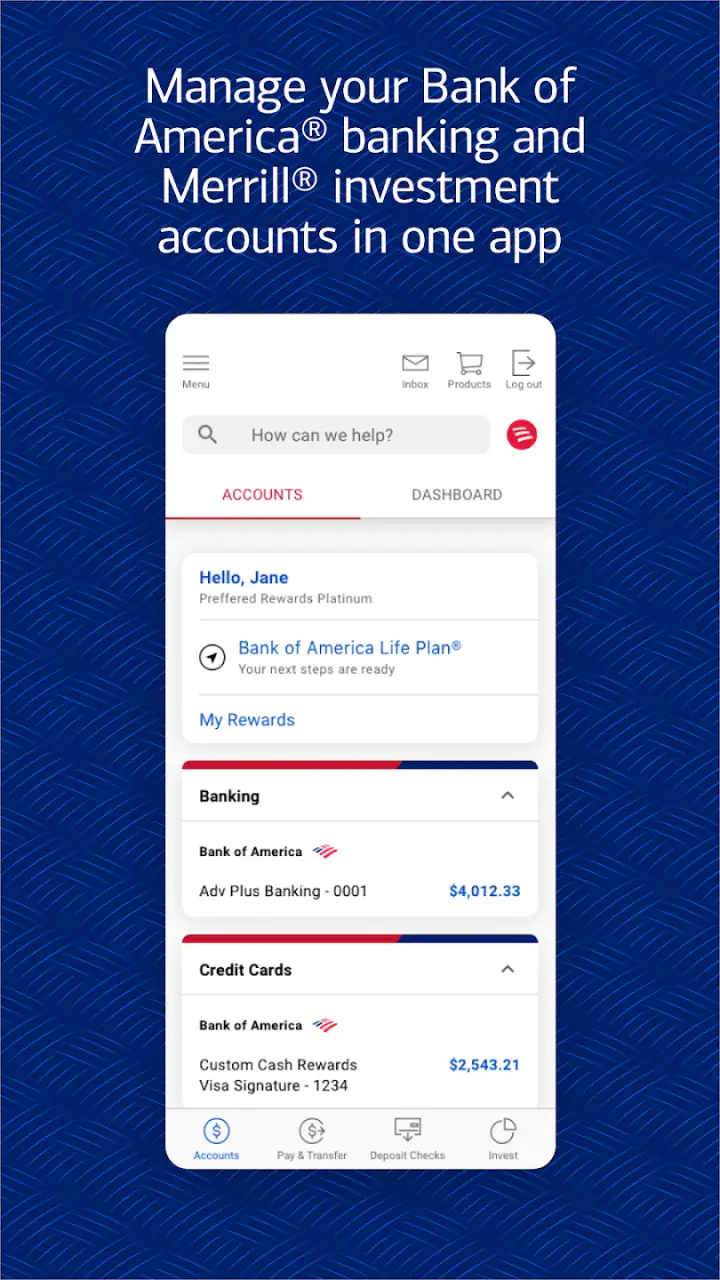
The app works best when I use it as a financial starting point, not as a replacement for every specialist tool. It gives a broad view and supports routine decisions, but users who enjoy building elaborate categories, custom reports, or advanced investment strategies may still prefer dedicated services for those jobs.
What happens during heavier use
Light use and heavy use are different tests. A quick balance check is simple; reviewing several accounts, looking through transactions, considering a budget, and then checking investments asks more of both the interface and the person using it. The app’s broad scope becomes more valuable in that situation, but the number of choices can also slow me down mentally even when the app itself feels responsive.
A realistic example is a payday evening. I might first confirm that money has arrived, review recent charges, decide how much can safely be moved toward a goal, and then look at investments. Bank of America Mobile Banking is well suited to that kind of connected review because the tasks belong to the same financial relationship. I would not expect it to turn that process into an instant decision, though. Seeing information together is helpful; interpreting it still takes attention.
Another heavy-use moment is preparing for a larger purchase. I would check the available balance rather than relying only on the account total, scan recent activity for pending or unfamiliar items, and then consider whether the purchase fits the month’s spending. The app is valuable here because it keeps the checking step close to the budgeting step. The important habit is not to treat the first number on screen as the whole story. A balance can look comfortable while upcoming commitments change what is genuinely available.
For users who rarely do more than confirm a balance, the extra areas may feel unnecessary. For users who regularly coordinate banking, budgeting, and investing, that same breadth can reduce app switching. The right choice depends less on technical enthusiasm and more on whether you will use the connected view.
Stability and recovery when something interrupts the session
Financial apps need a different kind of reliability from entertainment apps. If a video pauses, I can try again later. If a banking action is interrupted, I need to know what happened before repeating anything. That is why I pay attention not only to whether an app opens smoothly, but also to how carefully I behave after a timeout, an interrupted connection, or an uncertain confirmation screen.
With this app, I would avoid immediately repeating a payment or transfer-like action simply because the screen appears to hesitate. My safer workflow is to return to the relevant account activity and verify whether the transaction is already reflected before trying again. That is a useful discipline with any banking service, but a wide-ranging mobile app makes it especially important because several actions may sit close together.
I also prefer reopening the app and checking the account context after a session has been interrupted rather than assuming the last visible screen tells the full story. This is not a criticism of one particular function; it is sensible recovery behavior for mobile banking. The app is a tool for viewing and managing money, so confirmation should matter more than speed when the two conflict.
The broad customer base is reassuring in one limited sense: this is a mature, widely used banking application rather than an experimental finance project. Still, popularity does not guarantee that every phone, network, or session will behave identically. I judge reliability by whether the app supports careful verification, and that is where user habits remain just as important as the interface.
Device requirements and the practical question of compatibility
The current version is 26.02.02, and the minimum operating system is iOS or Android 11, depending on the device platform. That requirement is reasonable for many current phones, but it matters if you keep an older handset for banking or use a device that no longer receives operating system updates.
If your phone runs an older system, the first question is not whether the app looks appealing; it is whether your device meets the requirement. I would not plan a banking routine around an unsupported phone. Updating the operating system, when the manufacturer permits it, is the sensible first step. If that is not possible, using another official banking route may be more practical than forcing an incompatible installation.
Resource demands are harder to judge by appearance alone. An app that combines banking, budgeting, and investing naturally has more screens and data to organize than a basic balance checker. On a newer phone, that breadth is likely to feel normal. On an older device that technically meets the requirement, I would keep expectations moderate during account-heavy sessions and avoid judging the whole experience from a single slow moment.
I also recommend keeping enough free storage and maintaining a stable connection before doing important account work. Those are ordinary phone-care steps, but they reduce avoidable friction. For a banking app, I would rather prepare for a careful session than treat it like an app I can casually troubleshoot while rushing between errands.
Budgeting and investing without losing the banking basics
The budgeting side is most useful when it answers a practical question: where did my money go, and what can I reasonably do next? I would use it after reviewing actual account activity, not as a substitute for looking at transactions. That order helps separate confirmed spending from assumptions and makes the budget more grounded in what is really happening.
The investing area serves a different purpose. It can be convenient to see investments alongside banking, especially for someone who wants a general picture of cash and longer-term holdings. But convenience should not be confused with specialist depth. A person who makes frequent investment decisions, studies markets closely, or needs advanced analysis may find a dedicated investment service more suitable.
This is one of the app’s clearest trade-offs. Bank of America Mobile Banking can reduce the friction of moving between financial topics, but it may not satisfy users who want every topic treated as a separate professional workspace. I see the combined approach as a strength for awareness and routine review, not necessarily as the final tool for expert-level financial research.
Security habits matter more than a polished interface
Because this is a finance app for everyone, I would focus on habits before appearance. I would install it only on a phone I control, keep the device protected, and avoid doing sensitive account work on an unfamiliar handset. I would also check the account activity after important actions rather than relying on memory or an assumption that the process finished.
That advice is especially relevant when using the app in public. A quick balance check in a crowded place is different from reviewing detailed transactions or handling a sensitive account issue. I would use the app’s convenience without forgetting that the screen can expose personal financial information to anyone nearby.
Another useful habit is separating observation from action. First confirm the account and transaction details; then decide what to do. When an app offers banking, budgeting, and investing together, it is easy to move quickly from one section to another. Slowing down for a final check is a small price for avoiding an incorrect selection.
Who should choose it, and who should look elsewhere?
I think it is a strong match for an existing Bank of America customer who wants mobile access to everyday banking and appreciates having budgeting and investing nearby. It is also a sensible option for someone who dislikes maintaining several financial apps and would rather begin with a single familiar relationship.
I would hesitate if your main goal is anonymous or bank-neutral budgeting. The app is tied to Bank of America’s ecosystem, so it is not the natural choice for someone who wants one independent tool across many unrelated institutions. I would also look elsewhere if your priority is advanced investment research, highly customized financial reporting, or an extremely stripped-down interface with almost nothing beyond a balance and recent activity.
People managing money for a family or a small business should think carefully about their workflow too. A broad personal banking app may be convenient for personal accounts but may not replace the specialized controls, reporting, or collaboration features they expect from a dedicated financial service. The best fit is someone whose needs remain close to everyday personal banking, with occasional budgeting and investment review.
My performance verdict after living with the broader approach
Bank of America Mobile Banking feels most convincing when I use it for connected tasks: checking an account, understanding recent spending, considering a budget, and reviewing investments without starting from scratch in another app. Its perceived speed is strongest when I know the route I want, while its breadth can make exploratory sessions feel less immediate.
Stability should be judged with sensible recovery habits. If a session is interrupted, I would verify the account activity before repeating an important action. If the phone is older, I would confirm that it meets the minimum operating system requirement and keep expectations realistic during heavier use. Those are not reasons to avoid the app; they are the practical conditions for using any mobile banking tool responsibly.
The app is free and carries an Everyone age rating, which makes it approachable for a wide audience, but approachable does not mean equally suitable for every financial style. I would choose it for convenience, unified account awareness, and routine money management. I would pair it with a specialist service, or choose another option entirely, when detailed budgeting or investing becomes the main job.
My final recommendation is positive for Bank of America customers who want a central mobile banking experience rather than a single-purpose utility. The biggest benefit is not one flashy function; it is the ability to move through several everyday financial questions in one place. The biggest limitation is the same breadth: users seeking simplicity or specialist depth may find the compromise noticeable. For the right customer, though, Bank of America Mobile Banking is a practical financial hub that rewards a deliberate, organized workflow.
Before installing, I would check that the phone runs the required operating system and that I am comfortable using a full banking environment rather than a basic account viewer. If that matches your situation, the app is worth considering as a regular companion for banking, budgeting, and investing. Its strongest performance is not about rushing through every screen; it is about giving me enough context to make the next money decision with fewer app switches and fewer guesses.
FAQs for Bank of America Mobile Banking
What features does the Bank of America Mobile Banking app offer?
The Bank of America Mobile Banking app provides users with a wide range of features, including the ability to check account balances, view recent transactions, transfer funds between accounts, pay bills, and deposit checks using mobile check deposit. Additionally, users can manage credit card activity, set up alerts, and find nearby ATMs and banking centers.
Is the Bank of America Mobile Banking app secure?
Yes, the Bank of America Mobile Banking app is designed with security in mind. It utilizes advanced encryption technology to protect users' personal and financial information. The app also offers features like fingerprint sign-in and Face ID for enhanced security, ensuring that only authorized users can access their accounts.
Can I deposit checks with the Bank of America Mobile Banking app?
Yes, the app includes a mobile check deposit feature that allows users to deposit checks quickly and securely. Simply take a photo of the front and back of the check using your device’s camera, and follow the prompts to complete the deposit. Ensure good lighting and a clear image for best results.
Does the Bank of America Mobile Banking app support bill payments?
Absolutely. The app provides a convenient bill pay feature that allows users to schedule and pay bills directly from their mobile devices. You can set up one-time or recurring payments, ensuring timely and hassle-free transactions. The app also keeps a record of your payments for easy tracking and management.
How do I set up alerts in the Bank of America Mobile Banking app?
Setting up alerts is simple. In the app, navigate to the alerts section where you can customize notifications based on your preferences. Options include low balance alerts, unusual activity notifications, and transaction confirmations. This feature helps users stay informed and manage their finances more effectively.
Pros
- User-friendly interface
- easy navigation.
- Real-time alerts for transactions.
- Bill pay feature is convenient.
- Secure login with fingerprint ID.
- Quick access to account balances.
Cons
- Limited functionality offline.
- Occasional app crashes reported.
- Some features require online banking.
- Frequent updates needed.
- Privacy concerns with data access.


